

 ABK
ABK Alphacool
 Aqua Computer
 Aqua Tuning
 Arctic
 Barrow
 Barrowch
 EKWB
EKWB Hardware Labs
 Kingpin Cooling
 Phobya
 Prolimatech
 Thermal Grizzly
 Watercool
Uncategorized
Spring Cleaning: How to Flush and Refill Your Custom Water Cooling Loop
31
Mar
Mar
The weather is warming, windows are open, and it’s time for deep cleaning. While dusting and organizing, remember your custom water-cooled PC.
Routine maintenance may feel like a chore, but flushing and refilling your loop are critical for peak performance and corrosion prevention. Coolants break down, blocks clog, and colors fade over time.
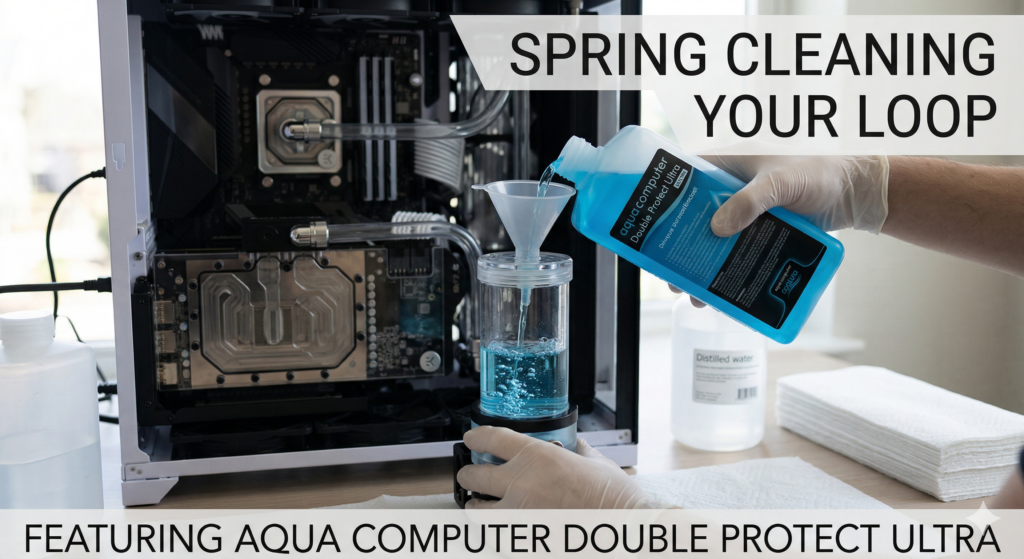
To prepare your rig for warmer months, FTC Watercooling offers this guide to flushing and refilling your loop with Aqua Computer Double Protect Ultra.
Let’s get your system running frosty again.
What You’ll Need Before You Start
Preparation is key. Before opening any fittings, gather: a drain container for old coolant.
- Plenty of paper towels: Spills happen. Be ready.
- Distilled water: For flushing out the old fluid. Buy a few gallons at your local grocery store; never use tap water.
- A squeeze bottle or filling funnel: To get the new coolant into your reservoir cleanly.
- A 24-pin PSU jumper: To power your pump without the rest of your PC.
- Fresh coolant: We highly recommend Aqua Computer Double Protect Ultra (more on why later!).
Step 1: Prep and Drain
- Power Down and Unplug: Completely shut down your PC, flip the power supply switch, and unplug the system from the wall.
- Place paper towels around fittings, under your GPU, and near the pump/reservoir.
- Open the Drain Valve: If you planned your loop well, you should have a drain valve at the lowest point. Place your container beneath it, attach a soft tube if necessary, and open the valve.
- Open your reservoir’s top fill port to let air in and help drainage. Gently tilt your PC to remove all fluid.
Step 2: The Distilled Water Flush
Once the old coolant is completely drained, it’s time to rinse out any remaining residue.
- Close the drain valve before moving to the next step.
- Fill with distilled water: Use your squeeze bottle or filling funnel to fill the reservoir with distilled water.
- Disconnect the motherboard’s 24-pin cable, use the bridging plug, and power only the pump. Cycle water to keep the pump from running dry. Stop before it empties, refill, and repeat until the loop is full.
- Let it run: Once full, let the pump run the distilled water through the system for a few hours.
- Drain the distilled water. Repeat flushing until the water drains clear if needed.
Step 3: Refill with Aqua Computer Double Protect
Now for the fun part: adding fresh coolant to your system. For this step, we are using Aqua Computer Double Protect Ultra (DP Ultra).
- Double-check that your drain valve is closed.
- Fill the reservoir: Pour the DP Ultra coolant into your reservoir until it’s nearly full.
- Cycle the pump using your PSU jumper, turning it off before the reservoir empties. Top off and repeat.
- Leave the fill port open or loosely capped. Let the pump run at full speed for 12–24 hours. Tilt the case gently to dislodge bubbles.
- When bubbles are gone and fluid is stable, top off, seal the reservoir, remove the jumper, and reconnect cables.
Product Spotlight: Why We Love Aqua Computer Double Protect Ultra
It’s easy to get distracted by marketing, but Aqua Computer Double Protect Ultra (DP Ultra) is a top choice for enthusiasts. We stock and use it at FTC Watercooling for good reason:
- Corrosion Protection: DP Ultra prevents galvanic corrosion, which is vital in mixed-metal loops.
- Low Electrical Conductivity: While no coolant is truly non-conductive forever, DP Ultra is engineered to deliver extremely low conductivity right out of the bottle, giving you an extra layer of peace of mind in case of a micro-leak.
- Zero Clogging: Unlike heavy pastel coolants that can drop out and clog your micro-fins over time, DP Ultra is a clear, dye-based fluid. It provides stunning, vibrant colors without leaving a thick residue, making your next flush easier than ever.
- Ready to Use: No measuring or mixing; it’s balanced right out of the bottle.
- Longevity: It boasts excellent long-term stability. While we recommend annual maintenance, DP Ultra is known to retain its color and protective properties longer than many competitors.
Ready for Summer Gaming
Properly flushing and refilling your loop keeps the hardware cool and keeps the loop clean. With Aqua Computer Double Protect, you’re set for a cool summer.
Need to get all your spring cleaning essentials now! Visit the FTC Watercooling store to stock up on distilled water, squeeze bottles, bridging plugs, and a fresh bottle of Aqua Computer Double Protect Ultra. Don’t wait—give your PC the upgrade it deserves today.
