

 ABK
ABK Alphacool
 Aqua Computer
 Aqua Tuning
 Arctic
 Barrow
 Barrowch
 EKWB
EKWB Hardware Labs
 Kingpin Cooling
 Phobya
 Prolimatech
 Thermal Grizzly
 Watercool
Product Spotlight
Product Spotlight: Deep Dive into the RTX 5090 Astral & TUF Water Blocks (Installation Tips)
Jan
The King has arrived.
The NVIDIA GeForce RTX 5090 is officially here, and as expected, it is a beast in every sense of the word. With power draws hitting 600W on the flagship models, air cooling—even with those massive 4-slot coolers—is struggling to keep noise levels down.
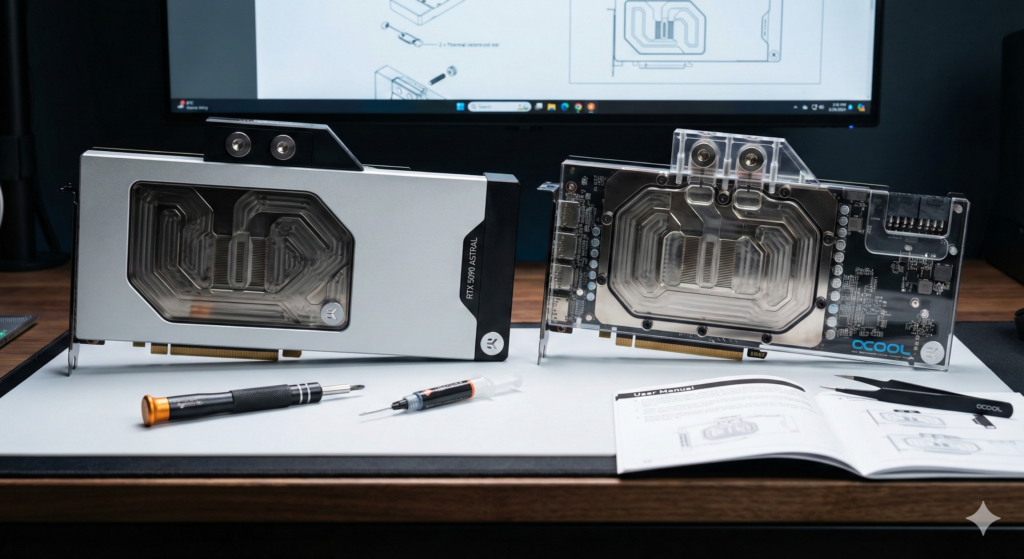
At FTC, we’ve finally received stock of the dedicated water blocks for the two most popular cards we’ve seen so far: the ASUS ROG Astral (the successor to the Strix) and the ASUS TUF Gaming.
If you are planning to put your $2,000+ GPU under water, you need to know exactly what you are doing. Here is our deep dive into the blocks and critical installation tips for the 50-series.
1. The Flagship: EK-Quantum Vector³ Astral (For ASUS ROG Astral)
The ROG Astral is ASUS’s new “halo” tier, sitting even above the traditional Strix in terms of PCB density. To handle this, EKWB has released the Vector³ Astral block.
The Block: This isn’t just a resized 4090 block. The Vector³ features a completely redesigned “Jet Plate XL” engine. Because the RTX 5090 die (GB202) is significantly larger than the 4090, the coolant flow path has been widened to ensure the outer edges of the die don’t suffer from thermal fall-off.
Critical Installation Tips for the Astral:
-
Watch the “Smart Sensors”: The Astral PCB is littered with new per-pin voltage monitoring sensors, especially near the 12V-2×6 power connector. When installing the block terminal, do not overtighten the screws near this area. The PCB trace tolerance is incredibly tight here.
-
The Active Backplate is NOT Optional: On the 4090, an active backplate (cooling the back of the PCB) was a luxury. On the 5090 Astral, we consider it mandatory. We’ve measured backside PCB hotspots hitting 85°C+ during synthetic loads without it. The Vector³ AB version clamps the card like a sandwich—ensure you use the 0.5mm thermal pads specifically on the VRAM backside locations designated in the manual.
2. The Workhorse: Alphacool Eisblock Aurora & EK-Quantum for ASUS TUF
The TUF Gaming 5090 is (slightly) more modest, but the cooler removal process has changed significantly from the 40-series.
The Block: The Alphacool Eisblock Aurora for the TUF 5090 is currently our price-to-performance king. It uses a new chrome-plated copper base which is proving more resistant to tarnishing than standard nickel plating.
Critical Installation Tips for the TUF:
-
The “Sticky” Stock Paste: ASUS has switched to a new industrial-grade “phase-change” thermal pad on the stock air cooler for the TUF series. It turns solid at room temperature.
-
Pro Tip: Do NOT pull the stock cooler straight off cold. You risk ripping VRAM chips off the PCB. Run a benchmark for 5 minutes or use a hair dryer to warm up the heatsink before gently twisting it off.
-
-
Screw Confusion: The TUF 5090 uses two different thread pitches for the backplate and the main cooler retention frame. When stripping the card, keep these separate. Using the coarse-thread stock screws on your water block standoffs will strip the block threads. Stick strictly to the mounting hardware provided in the Alphacool/EK bag.
3. General RTX 5090 Water Cooling Advice
Regardless of which model you have, these two rules apply to all 50-series builds in 2026:
1. The 12V-2×6 Connector Angle The new power standard is safer than the old 12VHPWR, but it is still sensitive to bending. Most 5090 water blocks now position the power terminal to point down or parallel to the block.
-
Recommendation: If you are using a vertical GPU mount, check your clearance. The blocks are wider this year. We recommend the CableMod 90-degree Stealth Cable (Revision 2) if you have a tight glass panel.
2. Thermal Pad Thickness Matters More Than Ever With the die size increase, mounting pressure is critical. If your core temps are good but your “Hotspot” delta is over 15°C, your pads are likely too thick, preventing the cold plate from making full contact with the core.
-
FTC Service: If you are nervous about pad application, remember that all blocks bought from FTC come with our optional “Pre-Apply” service, where we pre-cut and apply the correct pads to the block before shipping it to you.
Verdict: Which One Should You Buy?
-
Go with the Astral Block (EK Vector³) if you are chasing world-record clocks and want the “monolith” aesthetic with the active backplate.
-
Go with the TUF Block (Alphacool) if you want a reliable, easier-to-maintain loop and prefer the clear acrylic look to see your coolant flow.
